
Stop wasting hours guessing what makes a blog post rank. Writing SEO blog posts using Claude AI has become one of the most practical skills a beginner blogger can learn in 2026. Yet most people who try this fail for one simple reason: they give Claude vague instructions and expect a finished, ranking-ready article in return. The real secret lies somewhere else entirely.
This guide reveals the exact step-by-step process for writing SEO blog posts using Claude AI, from initial research to a polished, publish-ready draft. No special software is needed. No complicated plugins or coding knowledge are required either.
Why Claude AI Works Well for SEO Blog Writing
Claude follows detailed, multi-step instructions consistently, which matters enormously for SEO content. A typical blog post needs a specific heading structure, a target word count, and a focus keyword placed in particular spots. It also needs internal and external links plus a FAQ section. Fortunately, Claude can hold all of these requirements in mind across a long response without losing track of any single instruction.
That said, it helps to be honest about what Claude actually does well versus what still requires you. Claude handles the structural, factual, and reproducible parts of writing extremely well: organizing headings, drafting clear explanations, and following SEO formatting rules. However, Claude cannot replace your own first-hand experience or the unique perspective that makes your content stand out. As one content strategist who writes SEO articles with Claude daily puts it, Claude handles the eighty percent that is structural and reproducible. Meanwhile, you handle the remaining twenty percent that requires judgment and lived experience. Together, the strongest articles combine both strengths.

Tools You Will Need
Before starting, gather these free resources. None of them require a paid subscription to get started:
- A Claude AI account: The free tier works fine for most blog writing tasks
- A keyword research method: Google’s “People Also Ask” boxes, AnswerThePublic, or Google autocomplete all work without cost
- An SEO plugin: AIOSEO, Yoast, or RankMath if you use WordPress, to check your on-page optimization
- An image generator: Microsoft Copilot, Canva AI, or Adobe Firefly for creating featured and section images
- Your WordPress dashboard: Or whichever CMS you publish through
Before You Start: A Quick Checklist
Run through this checklist before opening a new Claude conversation. Doing so takes two minutes and saves significant back-and-forth later:
| Checklist Item | Why It Matters |
|---|---|
| Focus keyword identified | Determines what your article actually ranks for |
| Target word count decided | Keeps Claude’s draft length aligned with competing content |
| Target audience defined | Shapes tone, vocabulary, and examples used |
| At least one personal example ready | Adds the first-hand detail Claude cannot generate on its own |
| Two internal links picked | Strengthens your site’s internal linking structure |
Step 1 — Do Your Keyword Research First
Before opening Claude, identify your target keyword. This is the phrase you want your article to rank for on Google. Free tools like Google’s “People Also Ask” boxes and AnswerThePublic can help here. Even typing your topic into Google and noting the autocomplete suggestions works well too.
Avoid broad keywords like “make money online.” Instead, aim for something specific like “how to make money online with Claude AI” or “best free AI tools for beginners.” Specific keywords face less competition this way, and they match what someone is actually typing into Google. For a deeper walkthrough of this exact process, see our guide on the best AI tools to make money online.
Step 2 — Give Claude a Detailed, Structured Prompt
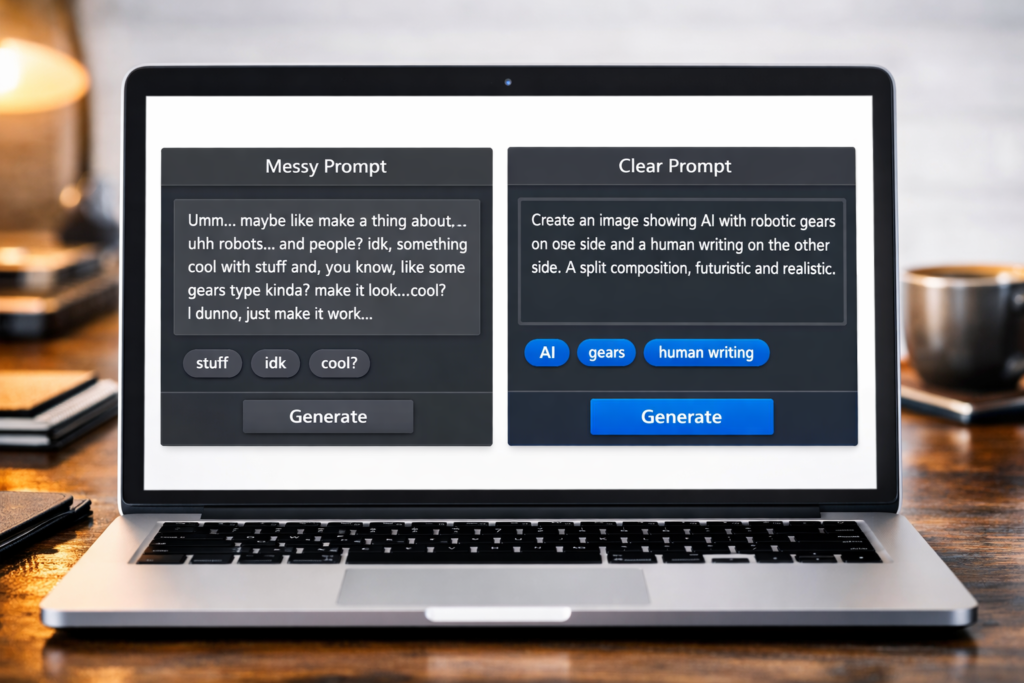
This is the single most important step in the entire process. A vague prompt produces a vague article, while a detailed, structured prompt produces a publish-ready draft. Therefore, your prompt to Claude should include:
- Your focus keyword and where it needs to appear (first paragraph, at least one subheading, naturally throughout)
- Target word count (2,000 to 2,500 words works well for most blog categories)
- Heading structure — introduction, H2 sections with H3 subheadings where needed, FAQ section, conclusion
- Tone and audience — who you are writing for and how formal or casual the writing should be
- Specific things to avoid — filler words like “Furthermore” or “Moreover,” exaggerated claims, or any topic-specific restrictions
- A request for a meta description under 160 characters that includes the focus keyword
Here is the difference this makes in practice. A vague prompt such as “write a blog post about AI tools” gives Claude almost nothing to work with. By contrast, a detailed prompt specifying word count, target keyword, heading structure, and audience gives Claude everything needed to produce something close to publish-ready on the first attempt.
| Vague Prompt | Detailed Prompt |
|---|---|
| “Write about AI tools” | “Write a 2,200-word post targeting ‘best free AI writing tools,’ five H2 sections, FAQ, comparison table” |
| No audience specified | “For a US audience aged 25-40 with limited time” |
| No tone guidance | “Clear, direct, no filler words like Furthermore or Moreover” |
| Generic, unfocused result | Near publish-ready first draft |
Step 3 — Review the First Draft Critically
Once Claude generates the draft, resist the urge to publish immediately. Instead, read through it as if you were a stranger landing on your site for the first time. Check for a few specific things:
- Does the introduction hook the reader in the first two sentences, or does it ramble before getting to the point?
- Are the examples generic or do they feel specific and useful?
- Does every section actually deliver on what the heading promises?
- Is the focus keyword present in the first paragraph, in at least one subheading, and spread naturally throughout?
If something feels generic or repetitive, ask Claude directly to revise that specific section rather than regenerating the entire article. Claude AI Projects proves particularly useful here, since you can keep your style preferences saved without re-explaining your requirements every time. To learn more about setting this up, read our guide on the Claude AI Projects feature.
Step 4 — Add Your Own Experience and Examples
This is the step that separates articles that rank from articles that get buried. While Claude can write a technically correct, well-structured article about almost any topic, it cannot add the specific detail that only comes from actually using a tool or living through an experience yourself.
For tools you have personally used, add a specific detail: a screenshot, a particular setting you discovered, or a mistake you made and corrected. For strategies, mention how long it took or what surprised you along the way. This single addition often does more for both reader trust and search ranking than any other edit. For more on combining AI tools with genuine income strategies, see our guide on how to make money online with Claude AI.
Step 5 — Optimize for On-Page SEO
Once your content reads well, run it through an SEO checklist. Using a plugin like AIOSEO makes this step straightforward, though the core elements to check remain the same:
- SEO title under 60 characters, with the focus keyword included
- Meta description under 160 characters, with the focus keyword included
- Keyword density of roughly 0.5 to 1.5 percent — natural repetition, not stuffing
- Internal links to two or three related articles on your own site
- External links to one or two authoritative, relevant sources
- Image alt text that includes the focus keyword where it fits naturally
Claude can help with this step too. Simply paste your draft back in and ask it to flag low keyword density or missing internal link opportunities. Often, this back-and-forth review process takes a draft from good to genuinely optimized.
Step 6 — Write a FAQ Section
FAQ sections have become standard in SEO blog posts because they directly answer common search queries. They can also earn featured snippet placement in Google results. To build one, ask Claude to generate five or six realistic search questions related to your topic, along with concise, direct answers.
Good FAQ questions are specific and mirror how people actually search. Rather than “What is X,” try “Can a beginner use X” or “How much does X cost.” These phrasings match real search behavior far more closely than generic, textbook-style questions.

Step 7 — Generate Image Prompts
While Claude cannot generate images directly inside a standard conversation, it can write detailed image prompts instead. Feed these prompts into a generator like Microsoft Copilot, Canva AI, or Adobe Firefly. Specifically, ask Claude to suggest four or five image placements throughout the article along with a descriptive prompt for each one. Doing so keeps your visual content aligned with what the surrounding text discusses, rather than generic stock photography unrelated to its section.
Step 8 — Final Read-Through Before Publishing
Before hitting publish, read the entire article one final time, ideally out loud. Doing so catches awkward phrasing, repeated words, and sections that do not flow naturally together. It is also worth checking that every internal link points to a live page, since a broken link can hurt both user experience and SEO.
What Google Actually Says About AI-Generated Content
Many bloggers worry that using Claude AI will get their content penalized or filtered out of search results. However, according to Google Search Central’s official guidance, appropriate use of AI or automation is not against Google’s guidelines. Instead, the actual concern is content created primarily to manipulate search rankings, not the use of AI tools themselves.
Google’s ranking systems reward content demonstrating E-E-A-T: experience, expertise, authoritativeness, and trustworthiness. This is exactly why Step 4 above matters so much. When an article combines Claude’s structural strength with your own real, first-hand experience, it checks every box Google actually looks for, regardless of which tool helped you write it.
Common Mistakes When Writing SEO Blog Posts Using Claude AI
- Publishing the first draft without review: Even an excellent first draft benefits from a critical read-through and at least one round of revision
- Giving vague prompts: The quality of your output is directly tied to the specificity of your prompt
- Skipping personal examples: Generic content rarely outranks content with specific, first-hand detail
- Ignoring keyword placement: A well-written article that never properly places the focus keyword will struggle to rank regardless of quality
- Forgetting internal links: Internal links help both readers and search engines understand how your content connects together
Frequently Asked Questions
Can Claude AI write a complete SEO blog post in one prompt?
Yes, with a sufficiently detailed prompt Claude can produce a complete, well-structured draft in a single response. That said, the best results almost always come from treating the first response as a strong first draft, then reviewing and refining it before publishing.
Does using Claude AI to write content hurt my Google rankings?
Not inherently, no. Google has publicly stated that appropriate use of AI is not against its guidelines. What actually matters is whether the content demonstrates genuine expertise and real value to the reader. Articles combining Claude’s structural strength with your own specific examples tend to perform well.
How long should an SEO blog post be?
Most competitive topics perform best between 2,000 and 2,500 words, though this varies by niche. Some simple queries are well served by shorter content, while in-depth guides often benefit from going longer. Ultimately, match your length to what genuinely answers the searcher’s question.
Should I tell readers that AI helped write the article?
There is no universal requirement to disclose AI assistance, though transparency remains good practice for personal experience claims. More importantly, both readers and search engines care whether the final content is accurate, helpful, and genuinely useful.
What is the best Claude model for writing SEO content?
For most blog writing tasks, Claude’s standard chat models handle long-form structured content well. For complex research synthesis, a more advanced model may produce thorough analysis at a higher cost. Meanwhile, for short tasks like meta descriptions, a faster, lighter model often suffices.
Can I use Claude AI Projects to speed up this process?
Yes, definitely. Setting up a dedicated Claude AI Project saves significant time once you write more than a few articles. You can store your style preferences once, and Claude applies them automatically in every conversation, eliminating repeated instructions.
Final Thoughts
Writing SEO blog posts using Claude AI is not about replacing your own voice or expertise. Rather, it is about removing the repetitive, structural work so you can focus on what actually requires human judgment: real examples and genuine insight. The honest framing experienced content writers use is simple. Claude handles roughly eighty percent of the structural work, while the remaining twenty percent still belongs to you.
Begin with a detailed, specific prompt, then review the draft critically rather than publishing immediately. Next, add your own real examples wherever possible, and optimize the on-page SEO elements carefully. Following this process consistently turns writing SEO blog posts using Claude AI into a repeatable system rather than a one-off experiment.