

Runway ML: The AI Video Tool That Helps You Earn Real Money Online
Do you want to earn money online? You can do it by creating professional videos from home. Video content is the most in-demand format today. However, traditional editing software can feel overwhelming for beginners. That is where Runway ML comes in. It is an AI-powered video tool that makes creation simple. It uses machine learning to generate high-quality videos. You only need text prompts, images, or short clips to get started.
Runway ML works well for both beginners and professionals. For example, you can produce social media clips, marketing videos, and client projects with ease. In addition, with the right approach and consistency, you can build a steady income through freelance work, social media, and digital product sales.
Understanding Runway ML
First of all, Runway ML makes it simple to create and edit AI-powered videos. You can turn photos, audio, and short clips into polished content. Furthermore, the platform is beginner-friendly but powerful enough for advanced users. Features like background removal, style transfer, and motion tracking give your videos a professional finish. As a result, you do not need any technical expertise to get great results.
For instance, one content creator used Runway ML to produce TikTok and Instagram videos. They grew their monthly earnings to over $1,500. Therefore, the key is to start with simple projects first. Then build confidence and gradually explore the more advanced features.

Setting Up Your Runway ML Account
Getting started with Runway ML is straightforward. First, visit the official website and click Sign Up. Then enter your email and password. In addition, use a professional email address. This keeps client communication and platform notifications organized.
Choose the Right Plan
The free plan is a solid starting point. It lets you experiment with core features and build an early portfolio. However, when you are ready for higher resolution exports and advanced AI tools, upgrading to a paid plan makes sense. For example, many creators start free, build a small portfolio, and then upgrade once they land their first clients
Complete Your Profile and Verify Your Account
Next, fill in your account details and complete the verification step. This keeps your account secure. It also ensures your projects are protected.
Explore the Dashboard
The dashboard is where you manage all your projects and saved assets. Therefore, spend a few minutes getting familiar with the layout. It is well organized and easy to navigate
Create Your First Video
Finally, use the free plan to test the tools. Produce a few sample videos to get comfortable. Most new users create their first video within ten minutes. This is especially easy using the Text to Video feature.
Creating Videos with Runway ML
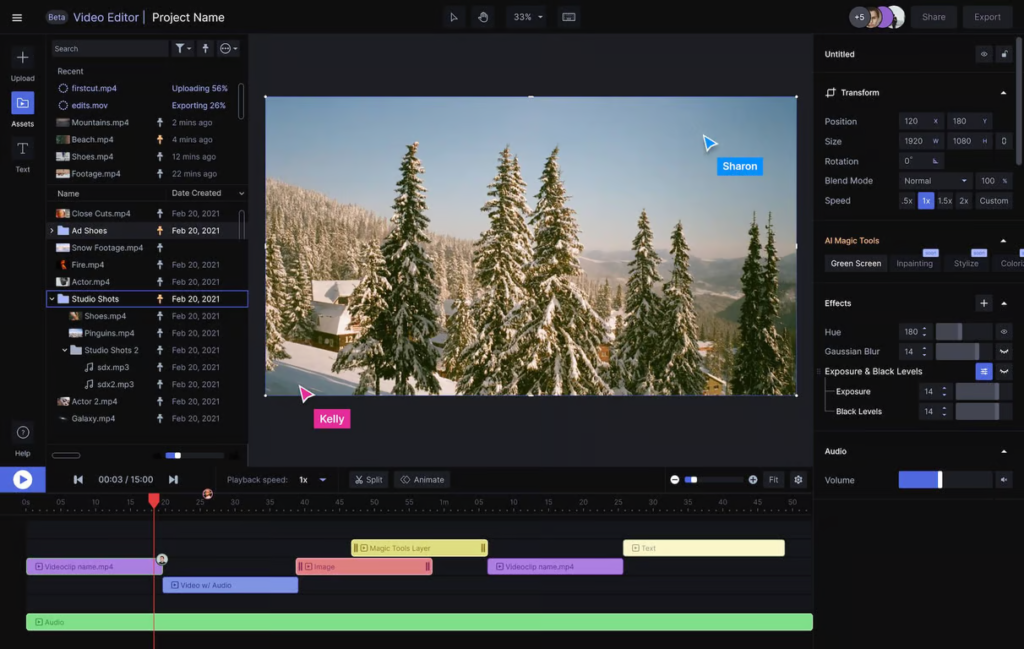
Creating videos in Runway ML is fast and easy. To begin, upload your photos, audio files, or video clips. Then select the AI features you want. For example, you can apply style transfer, text overlay, or motion effects. The platform offers automatic suggestions. However, you stay in full creative control throughout the process.
After that, export your video in high resolution. It will be ready to sell or publish right away. For instance, one freelancer used this workflow to produce short TikTok and Instagram videos. They sold each video on Fiverr for $200. As a result, the AI handles the repetitive technical work. Therefore, you can focus on strategy and creativity instead.
Tip: Keep videos short, punchy, and optimized for your target platform.
Video Editing and Enhancement
Editing is where Runway ML truly stands out. First, the object removal tool cleans up unwanted elements from any frame. In addition, color grading gives your footage a cinematic look. Furthermore, motion tracking and green screen tools let you apply advanced effects with minimal effort.
For example, one creator used background replacement and stock footage overlays. As a result, they landed a paid client order after showcasing the work online. Therefore, professional editing adds real value to your videos. It also directly increases what you can charge. Before exporting, adjust pacing and video length to match your audience. Always preview with the final audio in place.
How to Earn Money with Runway ML Videos
There are several proven ways to monetize your Runway ML skills. First, consider freelancing. Offer video creation services on Fiverr and Upwork. Short-form content for social media is in high demand right now.
In addition, you can earn through social media monetization. Post consistently on TikTok, YouTube Shorts, and Instagram Reels. Over time, this qualifies you for platform revenue programs.
Furthermore, you can sell digital products. Package your AI video templates and sell them on Gumroad or Etsy. Similarly, reach out to small businesses that need promotional videos. This can become a reliable client income stream.
Finally, try affiliate marketing. Create tutorial videos about AI tools. Then include affiliate links in your descriptions. For instance, one freelancer combined Runway ML with Jasper AI. As a result, they reached $2,000 per month within just three months. Therefore, building multiple income streams is always smarter than relying on one platform.
Runway ML Features and Tools
Runway ML includes a strong set of tools for all creator levels. For example, Text to Video generates content directly from written prompts. In addition, green screen and background removal deliver studio-quality results. Furthermore, Style Transfer applies cinematic or artistic looks to any footage. Motion tracking and object removal add precision to your edits. Finally, collaboration tools let you share and co-edit projects in real time.
For instance, one YouTuber applied Style Transfer across their content. As a result, they saw a 50% increase in channel engagement. Therefore, using these features creatively helps you stand out and grow faster
Growing Your Video Business with AI
Runway ML is not just for one-off projects. In fact, it is a platform you can build a full business around. As your client list grows, AI helps you manage multiple projects without burning out. For example, automation tools handle scheduling and repetitive tasks. As a result, you stay focused on the creative work that matters most.
In addition, use analytics and performance tracking to understand what content performs best. Then refine your strategy over time based on real data. For instance, one small agency used Runway ML to manage five clients at the same time. They did this without hiring any additional staff.
AI Video Success Strategy
Success in video creation comes from combining quality work with a smart strategy. First, focus on high-demand niches such as social media content, e-learning, and digital advertising. Then keep your videos short and engaging. In addition, act on client feedback and improve with every project.
Furthermore, build a strong portfolio across multiple platforms. Also, keep learning as AI tools continue to evolve. For example, one creator combined Fiverr gigs with YouTube Shorts. As a result, they reached consistent four-figure monthly income within six months. Therefore, the formula is simple — quality, consistency, and smart positioning.
Key takeaways:
- Focus on a high-demand niche
- Keep videos short and engaging
- Apply client feedback consistently
- Sell across multiple platforms
- Build a portfolio that shows your range
- Stay current with AI tool updates
Conclusion
In summary, Runway ML is more than just an AI video platform. It is a practical tool for building real online income. It helps you produce high-quality videos faster. In addition, it automates the repetitive parts of your workflow. As a result, you can scale your output without scaling your workload.
Moreover, with consistent effort and the right monetization strategy, you can grow a sustainable income. This can come from freelance clients, social media earnings, and digital product sales. Every successful video creator started with a single project. Therefore, the best time to begin is right now. Sign up for Runway ML, create your first video, and take your first step toward earning online.
FAQs
1. What is Runway ML and how does it work? Runway ML is an AI-powered video creation and editing platform. It lets you produce professional videos using text prompts, images, and clips. It also includes tools like background removal, style transfer, and motion tracking.
2. Is Runway ML beginner-friendly? Yes, it is. The interface is simple and easy to learn. You can start with templates and the Text to Video feature. Then gradually explore the more advanced tools as you grow.
3. How can I make money with Runway ML? You can offer video services on Fiverr and Upwork. In addition, you can monetize content on TikTok, YouTube Shorts, and Instagram Reels. You can also sell digital video templates on Gumroad and Etsy.
4. What are Runway ML’s most useful features? The top features include Text to Video, green screen, background removal, style transfer, motion tracking, and object removal.
5. What does it take to succeed in video creation? You need consistency, creativity, and a focus on your audience. Keep videos concise and follow platform trends. Also, refine your approach based on performance data regularly.
6. How much can you realistically earn with Runway ML? Freelancers typically charge $100 to $500 per video. Furthermore, with multiple income streams and regular output, earning $1,000 or more per month is very achievable.